





Loading...

BETA

Subscribe
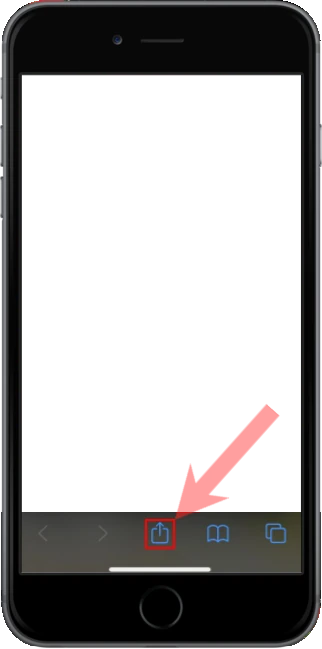
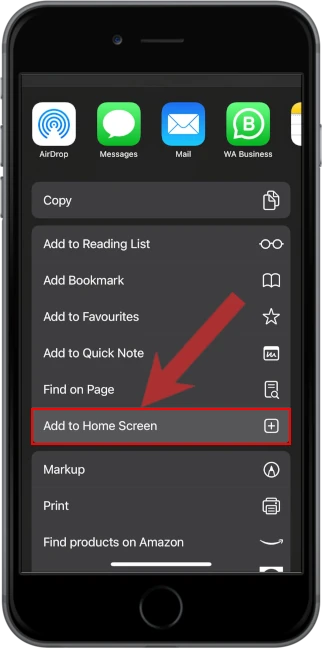
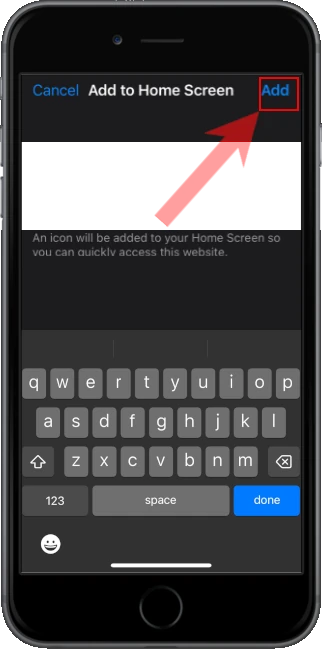
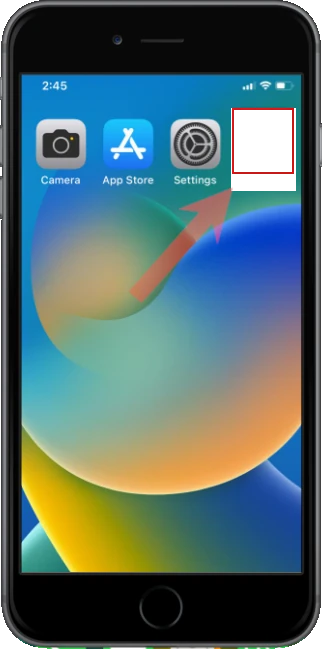
Apple iOS users

1. Open the menu located at the bottom of the screen

2. Select "Add to Home Screen" from the menu

3. Confirm and Add the app to your home screen

4. Open the app from your home screen

Onboarding

Get your venue on TTMenus

Share a few details and we’ll guide you through getting your venue and menu live on TTMenus (Search + Map + Hub).

What happens next

  • We reply with the next steps and confirm any missing info
  • We publish a draft listing for you to review
  • Once approved, your venue goes live

Account

Log in to mark this step complete.

Log in Sign up

Provision your TTMenus site

This creates your client site via the client-provisioning-service (CPS). Requires an account with the right role.

Choose your plan

Pick a starting tier. You can change later—final scope is confirmed in writing.

  • Free listing

    TT$0

    Get on the hub with a starter presence—upgrade when you're ready.

    • Listed in the TTMenus directory
    • Map pin & basic venue page
    • Eligible for indexing & broader SEO
  • Tier 2

    TT$8,000 / yr

    Extra marketing push and priority visibility windows.

    • Everything in Tier 1, plus social & promo support
    • Featured / priority exposure on the hub (per agreement)
    • Scoped in writing for your brand or group

Payment methods

Tell guests how they can pay (cash, transfers, payment links, in‑person card, etc.). Add as many as you need—you can revisit this when your theme or integrations are finalized.

Stored in this browser for your onboarding session. Not sent automatically with CPS; copy into your site CMS or config when ready.